🏕️ Lands #
The best way to start on the server is by creating a land, since griefing is allowed, it’s the only way to protect yourself against it.
The land system protects 16x16 blocks, that is, 1 chunk. You can naturally view chunks by pressing f3 + G. From now on, we will use the word “land” to refer to the number of sites that can be claimed by the player. A player (without rank) can have up to 3 lands. This maximum of lands can be increased by purchasing a rank
Each land can be used in all three dimensions (overworld, nether, and end). Therefore, optimize your lands well to get the best performance from them.
By default, you get 4 free chunks (including the initial one). You can expand this with claimblock, which you get by voting for the server. Each land can claim an infinite number of chunks, it all depends on your “claimblock” availability.
🚩 Basic lands - Creating a Land #
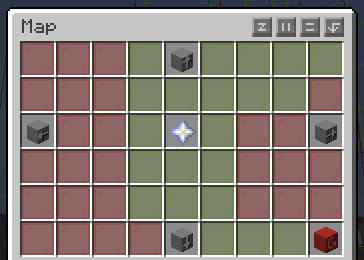
/lands maps It shows you a map of the area, where red is another player’s land where you don’t have trust. Yellow is where you do have trust. And green is your land. It’s especially useful for getting started and deciding where you want to place your land. Remember, you cannot create a land or make a claim if you are near another land. This can be solved with flags, which the other player (if they wish) can grant you.
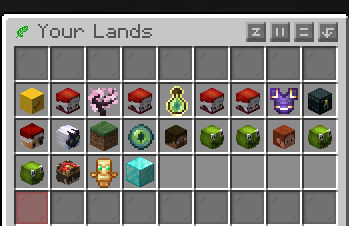
/lands This menu displays your lands and those of other users where you have trust. It’s important because you can execute almost all commands from within it. We’ll delve deeper into this later.
| Command | Description |
|---|---|
| /lands create [name] | Create a new land. Example: /lands create pizza |
| /lands edit [name] | You enter edit mode for your land. With that, you can execute the following commands |
| /lands rename [name] | Change the name of the current land |
| /lands claim | Claim more chunks in a land. By default, you get 4 free chunks (including the initial one). You can expand this with claimblock, which you get by voting for the server. Each land can claim an infinite number of chunks, it all depends on your “claimblock” availability. |
| /lands unclaim | You unclaim the chunk (it’s that simple). If you spent ClaimBlock, you get a refund. |
| /lands delete [name] | You eliminate the land |
| /lands view | You can see both your land and other players’ lands. Green (your land), red (another player’s land without trust), yellow (land with trust). |
| /lands setspawn | You set the spawn point of your land |
| /lands spawn [name] | You teleport to your own land or to other players’ lands where you have trust. |
🚮 Land removal due to inactivity #
To keep the map clean, there’s a land removal system. This takes several years to take effect. Don’t worry if you have 30 days (720 hours) of playtime; it would take about 2.5-3 years of inactivity for it to activate. Furthermore, the land’s ownership rotates among the members, thus preventing the land from being completely eliminated.
✅ Trusted, ⛔ ban and 🖇️ merged lands #
| Command | Description |
|---|---|
| /lands trust [player] | You give the player trust |
| /lands untrust [player] | Did the player you trusted break down your door? Don’t worry, you can remove the trust with this command |
| /lands ban [player] | You ban the player from your land, so they can’t enter your land. |
| /lands merge [land] | Merge two lands |
Trusted/ban example:
Merged land:
📋 The menu and flags #
As mentioned earlier, some commands can be executed directly from /lands. First, we select the land to edit, in this case “pizza”.
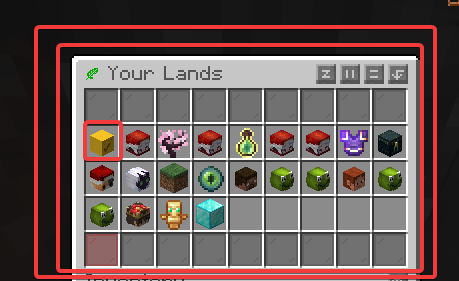
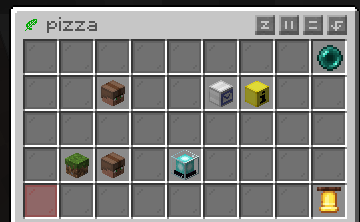
We will encounter the following menu:
🛂 Player management #
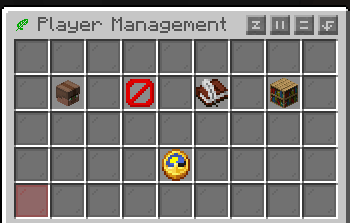
Members: Land members, you can directly add or remove players there
Banned: Well, banned players
Membership Request: In this section you can enable or disable automatic player joins to your land; this is ideal if you want to create a public land and want everyone to be able to teleport there
Natural flags
Important flags that will be disabled by default, as enabling them would allow players to grief your land. However, some nature flags are needed by technical/casual players for farming, etc.
| Flag | Description |
|---|---|
| Entity Griefing | Mobs will be able to break into your land |
| TNT Explosions | Enabled TNT Explosions |
| Water and Lava Flow | Allow water or lava flow from the wilderness |
🛅 Roles #
There are currently 4 roles:
| Role | Description |
|---|---|
| Owner | You |
| Members | Trusted player |
| Untrusted | Untrusted player |
| Custom rol | You can customize this role however you like; you create it by clicking the green button. |
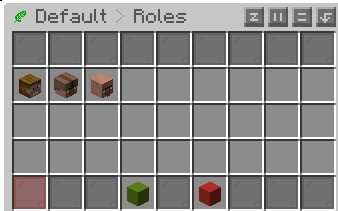
Clicking on one of them will take you to the following flags menu. In this case, we will edit the Members flag.
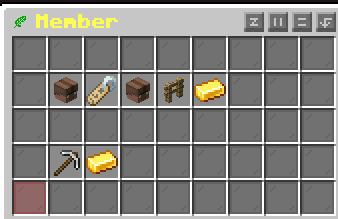
⛏️ Action Flags #
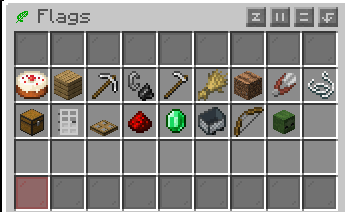
These are essentially the actions that the role can perform inside the land. The member role is fully active by default.
💼 Management Flags #
Warning: This section is crucial as it allows you to grant players permissions to claim land, build, destroy, and perform other actions. It is NOT recommended to modify these settings in an untrusted role.
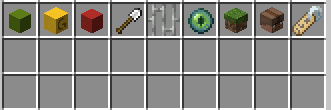
| Flag | Description |
|---|---|
| Trust players | Trust players on land |
| Set roles | Set roles on land |
| Untrust players | Untrust players on land |
| Claim and unclaim | It’s always recommended to leave this flag disabled, unless you have a lot of trust in the members of your land. |
| Claim Land at border | This allows players to claim land near the edge of your land. By default, each land is separated by one chunk. Enabling this flag allows lands to be contiguous, which is ideal for creating towns between players, helping to avoid blind spots and reducing potential griefing opportunities. |
| Edit Natural Flags | Edit Natural Flags on land |
| Edit Role Settings | Edit Role Settings on land |
| Edit miscellaneous Settings | Edit miscellaneous Settings on land |
🍄 Miscellaneous #
💬 Land chat #
Want to make plans with members of your lands? There’s an option to speak exclusively with members of your lands.
Simply use the following: @lands [message]. To write to a specific land, use @lands [land] [message].
🌈 Change the land color and hide land entry message #
While directly in the land area, you can type the command /lands rename [name]. Below is a list of colors you can use. Example: /lands rename &d&l Cherry
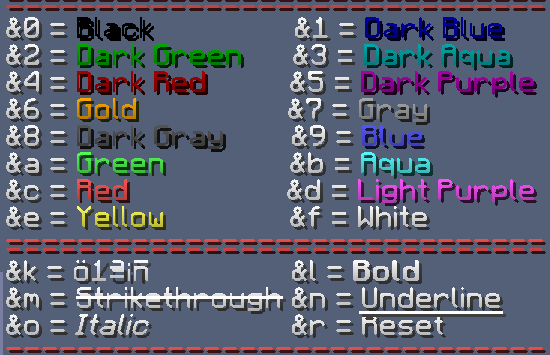
If you’re shy and want to hide the welcome to your land, you can do the following:
Bibliographic reference #
Lands main page: https://wiki.incredibleplugins.com/lands
Color codes: https://www.spigotmc.org/resources/colorcodes.32415/